Last week I pointed a security scanner at this blog and wrote up what it found — one genuine finding in the open-graph font loader, and a scanner that kept reporting the same line long after I’d fixed it. That post is about the bug. This one is about the tool.
Aikido is not paying me, has not spoken to me, and has no idea I exist beyond a workspace with my repo in it. What follows is what happened when I ran it from a Fedora 44 terminal against ownyourstack.dev, including the bit where a reassuringly green result turned out to be measuring less than it appeared to.
What Aikido actually is
It is a code security platform — the sort of thing that would normally be five separate subscriptions. Four scanners, as documented on their docs site:
- code (SAST) — static analysis of your source
- dependencies (SCA) — vulnerabilities in your package tree
- iac — misconfigurations in infrastructure definitions
- secrets — keys and credentials that ended up in your tree
The pitch is consolidation. One feed, one severity scale, one place a finding goes when it is real and another when it is noise. For a person with a blog, that pitch is either very persuasive or very silly depending on how you feel about dashboards.
Worth saying up front: their documentation is genuinely good. It is published on GitBook, there is an llms.txt index, and you can append .md to any page URL to get it as plain markdown — which is how I read it in a terminal rather than a browser. Small thing. Noted, because so much developer documentation is a marketing page with a search box bolted on.
The bit that made me try it: it runs locally
Most scanners want your repository connected to their service. Aikido’s Local Scanner is different — you download a binary, point it at a directory, and the scan happens on your machine. The results go up; the code does not.
From their own description: “ensuring your code never leaves your premises.”
For a personal site that is the entire argument. This repo is 152 tracked files — 37 markdown, 45 TypeScript and Astro, 39 SVG diagrams I drew myself, and a 213 KB pnpm-lock.yaml. None of it is secret. All of it is mine. Sending it to be indexed so I can be told my loadGoogleFont.ts has a problem felt like a bad trade. Being told the same thing without sending it felt like a fine one.
Setting it up on Fedora
Real steps, in the order I hit them. The whole session was one terminal — micro open on the code I expected to change, the scanner binary sitting next to the repo. No IDE, no extensions, nothing that needed a restart.
1. Check the architecture. They support x86_64 and ARM64. Mine is x86_64:
$ uname -m
x86_64
2. Get a token. Settings → Local Scanner at app.aikido.dev/settings/integrations/localscan. Their docs are explicit that you only see it once, which I appreciated until I closed the tab having not copied it. Generate another. Fine.
3. Download the binary from the Aikido UI, then:
$ chmod +x aikido-local-scanner
$ ./aikido-local-scanner --version
No package, no build step, no sudo — which on this machine is a feature rather than a footnote, since I have deliberately not handed out the password.
4. Run it. The documented shape is:
aikido-local-scanner scan path_to_my_repository \
  --apikey AIK_CI_xxx \
  --repositoryname DemoApp \
  --branchname main
Mine, pointed at the repo on master:
./aikido-local-scanner scan . \
  --apikey "$AIKIDO_API_KEY" \
  --repositoryname ownyourstack \
  --branchname master
Results land in the Aikido feed under the repository name you passed, which is also how the repo gets created if it wasn’t there.
Two operational notes from the docs that matter on a laptop. It creates a temporary .aikidotmp directory for lockfiles and scanner output, cleans it up afterwards, and Aikido recommends having 10 GB free for the working directory — more than this entire repo, so the requirement is really about the scanners’ internals rather than your project. And there is a Docker image (aikidosecurity/local-scanner) if you would rather not run an unknown binary directly; on a machine where Docker was recently deleted for being unused, I took the binary route.
What came back
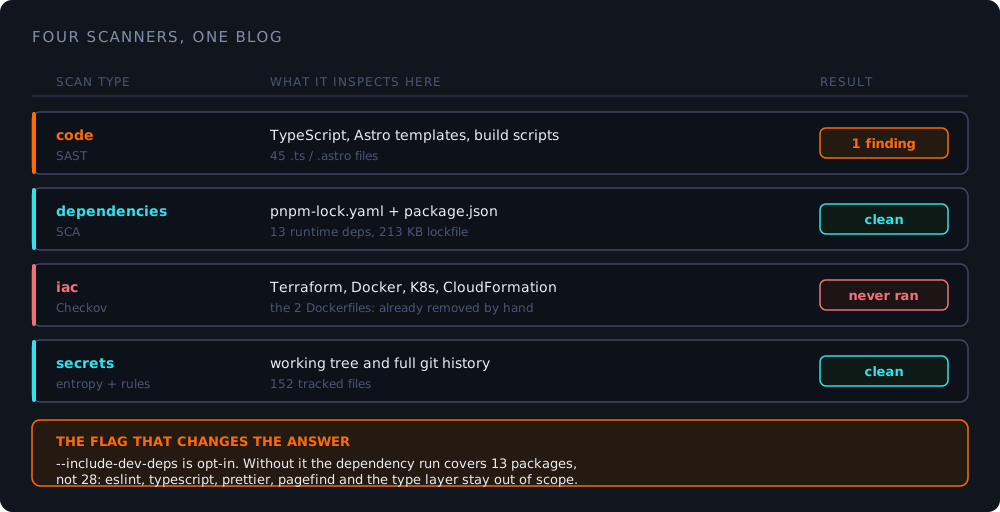
Selecting scanners is --scan-types, whose choices are code, dependencies, iac and secrets. Run all four and here is what each said about this blog.
secrets — clean. Working tree and history, 152 files. I had a mild dread about this one, because this site is mostly about terminal configuration and I have committed enough plain text over the years to have earned a hit. Nothing.
dependencies — clean. 13 runtime packages, including sharp and satori and @resvg/resvg-js, which do the heavy work of rendering those 1200×630 preview images at build time. Native image libraries are exactly the kind of dependency that quietly earns a CVE, so a clean row here was the result I actually wanted.
code — one finding. AIK_js_ssrf, severity 60, in src/utils/loadGoogleFont.ts. I wrote about it at length last time: a fetch whose target came out of a stylesheet response rather than out of my own code. Real pattern, not exploitable as it stood, fixed with a twelve-line origin allowlist.
iac — never ran.
The first thing worth writing down
That last one is the honest headline: the infrastructure scanner did not produce a result. It produced an error — Checkov is not configured correctly — on both a full scan and a targeted one.
Checkov is Aikido’s engine behind the iac scanner. You can tell from the CLI options, which expose a --checkov-skip-extension flag for skipping file extensions by Checkov specifically. It is not a scanner they bolted on; it is the thing underneath.
What made this worth more than an eyeroll is that nothing in the interface said “this column is empty because it never ran.” It sat next to three columns that had genuinely run, in a report that otherwise looked complete. If I had not already known my repo used to contain a Dockerfile and a docker-compose.yml — which I removed by hand after reading them and finding they were unused boilerplate referencing a dev command that would never execute — I would have had no reason to be suspicious of an empty infrastructure column at all.
An empty result and a result that never happened look identical. That is a design problem, not a scanner bug, and it is the single most useful thing I took away.
The second thing: a flag that makes your green tick lie a little
The clean dependency row was the one I was proudest of. Then I read the CLI options properly.
--include-dev-deps   Enable scanning of development dependencies
                     (e.g., devDependencies in package.json, etc.)
Opt-in. Which means a default dependency scan covers dependencies and skips devDependencies.
For most web apps that is a defensible default. For this repo it quietly halves the job, because a static site’s toolchain is where a surprising amount of the risk lives. Of my 28 packages:
| Count | Examples | |
|---|---|---|
| Scanned by default | 13 | astro, sharp, satori, tailwindcss, dayjs |
| Skipped by default | 15 | eslint, typescript, prettier, pagefind, @astrojs/check, @shikijs/transformers |
pagefind is the search index. @astrojs/check and typescript run during my build. eslint runs in CI. These are not decorative dev dependencies I would never install on a production box — there is no production box, and they execute on every single push.
So the row that said clean was telling the truth about 13 packages and passing silently on the other 15. Not a bug, and not hidden — the flag is documented, in the help text, discoverable by reading one page. But the default is the one that flatters you, and I only caught it because I was writing a review and therefore read the options list like a lawyer.
./aikido-local-scanner scan . \
  --apikey "$AIKIDO_API_KEY" \
  --repositoryname ownyourstack \
  --branchname master \
  --include-dev-deps \
  --scan-types dependencies
The same applies in reverse, incidentally: --exclude and --checkov-skip-extension exist, which means it is entirely possible to build yourself a scan configuration that finds nothing and reports success. The tool will not stop you. That is what gating flags are for.
The MCP server, if that is how you work
Aikido also ships an MCP server (@aikidosec/mcp) for AI coding assistants, which is the more interesting integration for anyone whose editor can call tools. Rather than a one-shot scan it exposes three:
aikido_scan_paths— SAST, secrets and IaC on files already on disk; the preferred one, since it reads from disk rather than shoving file contents through a conversationaikido_full_scan— dependency manifests and lockfilesaikido_issues_list— pull issues out of your feed
Authentication is either a browser login (aikido_login) or a personal access token from Settings → Integrations → IDE → MCP, exported as AIKIDO_API_KEY. It needs Node for npx; here that is v24.14.1.
The honest caveat, and it is a real one: I could not use aikido_issues_list to file anything. It returned 400 — Feature is disabled for workspace BitzyLabs, and fixing that needs a permission toggle at app.aikido.dev/settings/integrations/ide/mcp/permissions that I do not hold. So the one thing I most wanted to do with it — mark that AIK_js_ssrf as a false positive and tell them why — was the one thing the workspace would not let me. I have not been able to confirm whether that gate is a plan limit or a workspace setting, and I would rather say so than guess.
One nit, because I am reviewing
Their Linux setup page tells you to select scanners with --scanners. Their CLI options page documents --scan-types. Both describe the same feature. I tried the one on the Linux page and got the one from the options page, which is exactly the sort of small documentation seam that costs someone ten minutes at 11pm. Trivial. Noted, because if you are reviewing a tool and only report the nice things, you are not reviewing it.
The verdict
For a single person with a static blog, the local scanner is the correct version of this product. Code stays on disk, it is one binary, no sudo, and it finds things I had stopped looking for. The dependency and secrets results are genuinely useful, and the SAST finding was real enough that I changed code over it.
What I would want changed, in order:
- Never silently omit a scanner. An errored
iaccolumn should be marked errored in the report, not rendered as an empty one. - Say what the default excluded. The dependency result should carry a line — 15 devDependencies not scanned, pass
--include-dev-deps— right there next to the tick. - Make suppression reachable. If the workflow that produced a false positive cannot be the workflow that reports it, the loop does not close.
None of those are dealbreakers. All three are the difference between a tool that reports and a tool you can trust what it reports about — which is, annoyingly, the same distinction I keep drawing on this site about everything from CDNs to AI coding assistants.
The scanners are honest. What they tell you is only as complete as the flags you remembered to pass.
I have run it three more times since, mostly to watch what the --include-dev-deps row actually says. Two of those runs were to check that the fix held, which is a habit I did not have a fortnight ago and which is, I think, the actual return on a free scanner.
What’s the default in a tool you rely on that you’ve never actually checked the meaning of — and is it about to eat an afternoon? 👇