Three terminals open. Three jobs running. One brain trying to hold all of them.
That was the shape of a perfectly ordinary day in August, and the only reason it didn’t end in a mess of half-applied diffs is that I’d finally stopped treating codex as one command. It’s three. And which of the three you type decides what that thread is allowed to do next.
The Three Names 🏷️
For a long time I assumed the subcommand was cosmetic. Interactive or not — same engine underneath, right?
No. Each of these opens a genuinely different kind of session:
| Command | What starts | Where it goes afterwards |
|---|---|---|
codex | The interactive TUI | Stays attached. I drive it turn by turn. |
codex exec | A non-interactive run | Does the job and gets out of the way. |
codex resume | A saved session | Reattaches to an existing thread with its history intact. |
Same binary — codex-cli 0.154.0 on this machine — but three different relationships with my attention:
codexwants me in the seat. Options get forwarded to the interactive CLI and it stays open until I close it. Right for anything where the next instruction depends on what the last one did.codex exec(shortened tocodex e) wants me gone. It runs once and exits. If I pipe something in, that stdin gets appended as a<stdin>block — sogit diff | codex exec "review this"does exactly what it looks like it does.codex resumedoesn’t start anything at all. It picks a thread back up. The argument is a session id or a session name, and there’s a--lastflag when I just want the most recent one without looking at a picker.
That third row is the one that changed how I work.
Naming Is The Whole Trick 📛
Here’s the part I’d underline if I could only keep one sentence of this post:
Parallel threads are only safe if you can tell them apart without reading their output.
codex resume --last is a footgun the moment more than one thread exists — “the most recent” is a race condition, and I have lost work to that exact assumption. So the rule became: if a thread is going to outlive the terminal that started it, it gets a name at birth.
Three threads, three names, three jobs:
codex                       → the thread I'm driving by hand
codex exec                  → the thread doing something boring and long
codex resume <name>         → the thread I keep coming back to
And because codex archive and codex delete both take a name as readily as an id, tidying up doesn’t mean hunting through UUIDs either:
$ codex archive billing-refactor
$ codex delete scratch-prompt-test
The name is the interface. The UUID is just an implementation detail I shouldn’t have to look at.
The Three Threads, Side By Side 🧶
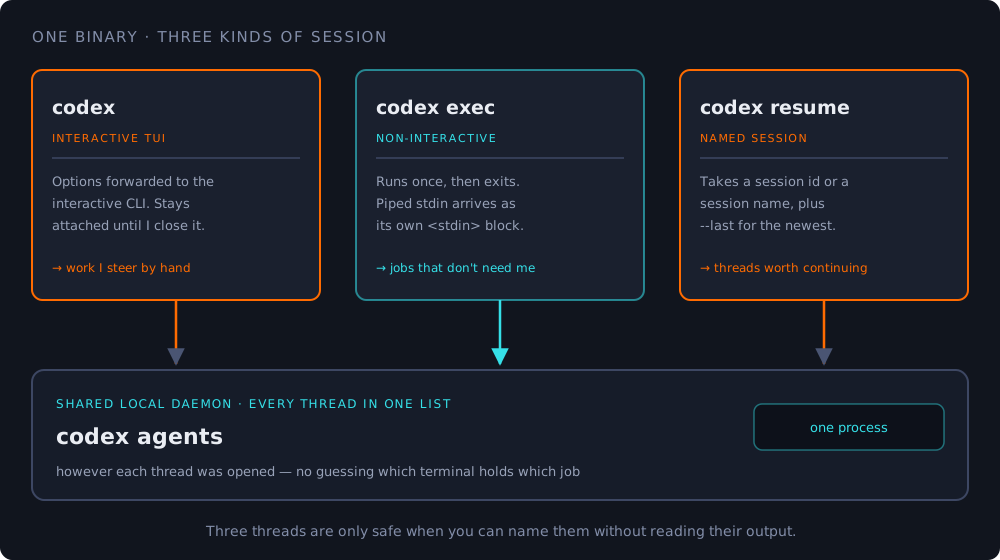
The arrow that matters is the one at the bottom. Sessions live on a shared local daemon, which is why codex agents can browse all of them from one place regardless of which command opened each. That’s the feature that makes three threads a workflow instead of three unrelated windows I have to remember the state of.
$ codex agentsOne list. Every thread. No guessing which terminal held which half of the job.
What Each Thread Is Allowed To Touch ✋
Naming them turns out to be only half the discipline. The other half is deciding — before they start — which one is permitted to change files.
The split I’ve settled on:
- The thread I’m driving gets the working tree. It’s the only one with my full attention, so it’s the only one that should be moving code underneath me.
- The one-shot thread gets read-only work: reviews, explanations, “what would break if…” questions.
codex exec reviewis built for exactly this and doesn’t need write access to answer well. - The returning thread gets a branch of its own, and never the one I’m sitting on.
Two threads writing to one working tree is not parallelism. It’s two authors with one pen.
And when a thread finishes and its diff is worth keeping, there’s a command for that too — codex apply hands the most recent diff to git apply on my working tree, rather than me copy-pasting output between windows like it’s 2019.
The Check I Run When Something Smells Off 🔧
The one command I’d memorise alongside the three above:
$ codex doctorIt diagnoses the local installation, the config, the auth and the runtime health. When three threads are misbehaving at once, the boring answer is almost always one of those four — and I’d much rather be told that in ten seconds than discover it in the middle of a rebase.
Config itself lives in ~/.codex/config.toml, and any single run can override a key without editing the file:
$ codex exec -c model="..." "explain the failing test"Which means a thread can be configured differently from its siblings without any of them knowing about it. Useful. Also, the reason naming matters — otherwise I have no way of remembering which one I pointed at what.
What Three Threads Actually Buys Me 🎯
Not speed, mostly. Continuity.
The failure mode of one long thread isn’t that it’s slow — it’s that it accumulates. Every exchange makes the next one heavier, and eventually I’m paying to re-explain context I already settled twenty messages ago.
Three short threads with names beat one very long one for the same reason three small branches beat a six-month-old megabranch: you can drop one without losing the rest.
So: codex when I need a conversation, codex exec when I need an answer and then silence, codex resume when the conversation was worth continuing. Three names, three jobs, one daemon holding all of it.
That’s the whole setup. It took me embarrassingly long to notice the subcommand was the point. 🧵
Do you run agents in parallel, or does the context-switching cost eat the gains? I’d genuinely like to know where the line is for other people. 👇